12. Odin1 Time Synchronization
1. Overview
- By default, Odin1 uses the on-board boot time as its system time, which is inconvenient for downstream development.
- Odin1 provides an NTP-like soft time-synchronization feature that aligns the Odin1 clock to the host clock.
2. How to Use
In the driver file /odin1_ros_driver/config/control_command.yaml, set use_host_ros_time: 2:
  # 0: use odin internal system time as data time stamp, typical and recommended;
  # 1: use host ros time (upon receive) as data time stamp, only use if you specifically require this setup, not recommended for most users
  # 2: align odin1 time to host time, timestamp is the sensor data reception time on host time axis
  use_host_ros_time: 2
3. How It Works
The PC (host SDK) and Odin1 (LiuYeDao firmware) perform a single NTP-like time exchange and record four timestamps:
- t0: time the host sends the request
- t1: time the device receives the request
- t2: time the device sends the reply
- t3: time the host receives the reply
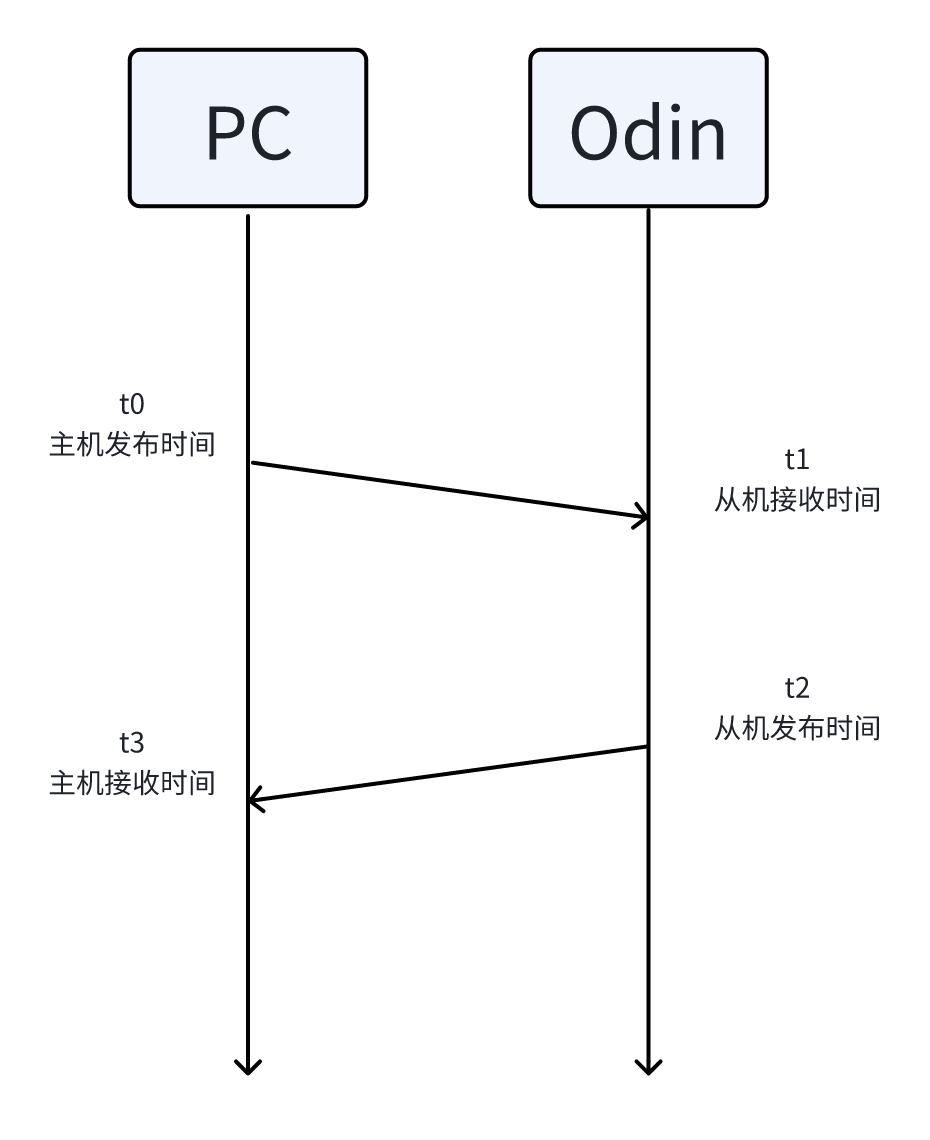
Principle:
\[T_{\mathrm{delay}} = (t_3 - t_0) - (t_2 - t_1)\] \[T_{\mathrm{offset}} = \frac{(t_3 + t_0) - (t_2 + t_1)}{2}\](Physical meaning: $T_o - T_{\text{offset}}$.)
Implementation:
- Compute delay and offset
- The host sends a periodic heartbeat carrying the send time
t0. - The device receives the heartbeat and caches
t0together with the receive timet1. - Before sending the heartbeat reply, the device records the send time
t2and packst0,t1,t2into the reply. - The host receives the reply and records the receive time
t3. - The delay and offset are then computed using the formulas above.
- The host sends a periodic heartbeat carrying the send time
- Timestamp compensation on data
- A 30-frame sliding window is used to smooth the delay and offset.
- If the user has chosen to use host time, the offset is added to all data timestamps published by the driver.