6. Mapping and Relocalization API Workflow
6.1 Overview
This chapter describes the recommended API call workflow for the mapping and relocalization features in typical scenarios.
6.2 Concepts
- Device: the Odin1 device.
- Host: the machine that connects to Odin1 and runs the host application that calls the API.
- Device operating mode: Odin1 provides two main operating modes — algorithm and sensor.
- Sensor mode: the device only streams raw sensor data.
- Algorithm mode: an internal algorithm running on the Odin1 device. There are three sub-modes — odometry, SLAM, and relocalization.
- Map file: a special-format map file generated by the on-device algorithm in SLAM mode.
6.3 Overall Flow
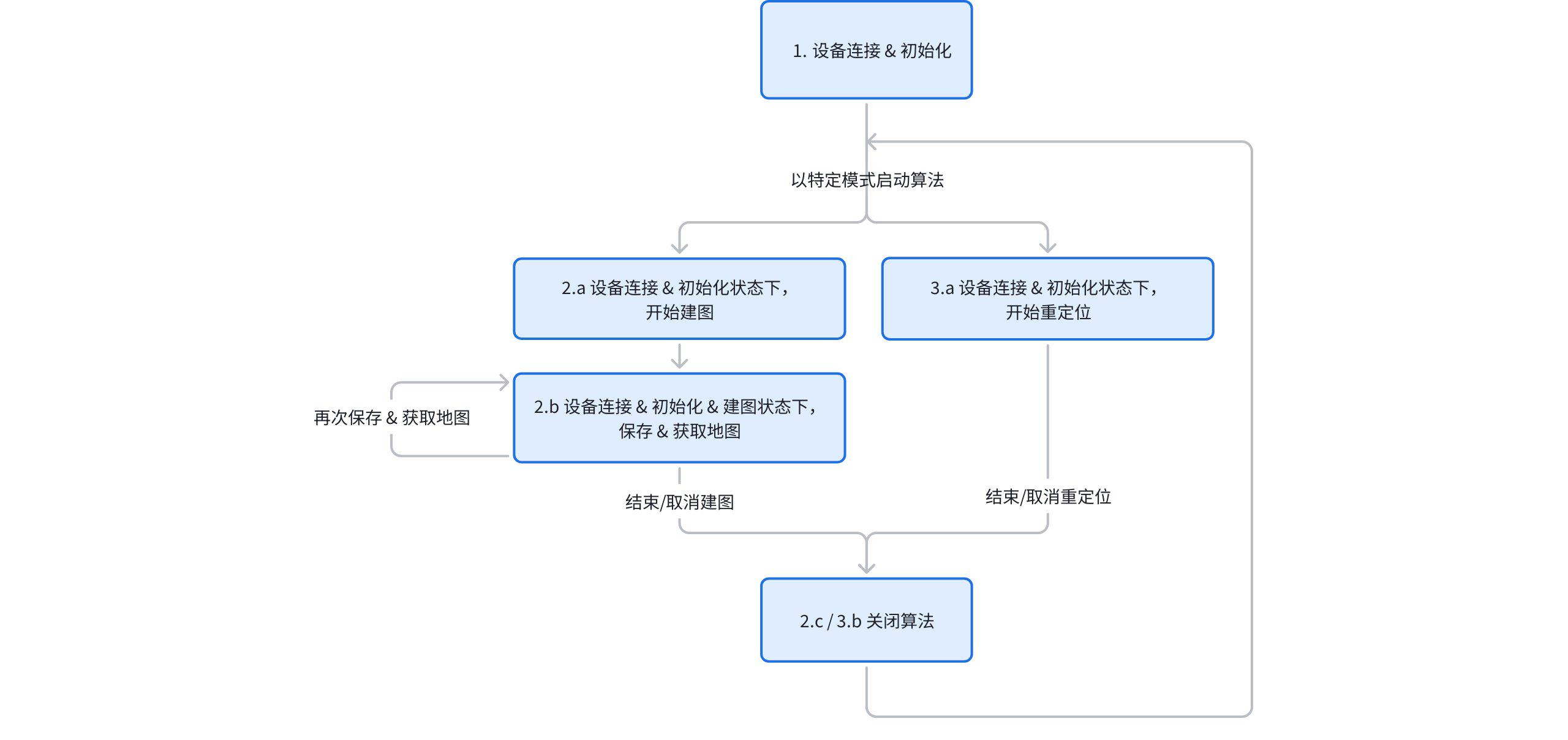
After initializing and starting the device, keep the connection alive and use the dedicated APIs to control the device’s working mode (raw / SLAM), the algorithm sub-mode (odometry / mapping / relocalization), and the on/off state of specific data streams. This ensures fast device response and avoids repeated reconnection and re-initialization of the device.
6.4 Detailed Workflow
6.4.1 Device Connection and Initialization
// Initialize the SDK and prepare to connect to the device
lidar_system_init(lidar_device_callback_t cb);

// Inside lidar_device_callback, handle the device connection:
lidar_create_device(lidar_device_info_t *dev_info, device_handle *device);

// Get the device version
lidar_get_version(device_handle device);

// Get the calibration file
lidar_get_calib_file(device_handle device, const char* path);

// Register the data callback
lidar_register_stream_callback(odinDevice, data_callback_info);

// Initialize the device
lidar_open_device(device_handle device);
6.4.2 (Optional) Enable Encrypted On-Device Logging After Connection / Initialization
// Call this after the device callback (device_cb) is received, but before lidar_open_device.
// Encrypted logs produced while the device runs will be continuously written to dest_dir.
// dest_dir must already exist; it is recommended to use a separate sub-directory per connection
// for easier archiving.

const char* dest_dir = "/home/user/odin_logs/Conn_20260610_101530";
int ret = lidar_enable_encrypted_device_log(odinDevice, dest_dir);
// Returns 0 on success, -1 on failure.

// There is no "stop logging" API; if you do not call this API, logging is simply not enabled.
// When troubleshooting, just zip up the entire dest_dir and send it to the vendor support.
Notes:
- This API must be called before
lidar_open_device, otherwise the startup-period logs will be lost. dest_diris not auto-created by the SDK; the caller must create it (e.g.mkdir -porstd::filesystem::create_directories).- Unlike “save map” in 6.4.4, this API does not require polling, and there is no separate API to pull logs from the device to the host — the SDK continuously writes logs to
dest_diron the host side. - This corresponds to
save_log: 1in the ROS driver’scontrol_command.yaml. Pure SDK clients do not need this YAML; just call this API directly.
For a reference implementation, see host_sdk_sample.cpp (the g_save_log branch inside device_cb); the header is declared in lidar_api.h.
6.4.3 Mapping: Start Mapping (Once Connected and Initialized)
// Enable the on-device algorithm
int type = LIDAR_MODE_SLAM;
lidar_set_mode(odinDevice, type);

// Configure the algorithm sub-mode to SLAM: set the "map_mode" parameter to 1.
// "map_mode" values:
//   0: normal odometry mode
//   1: SLAM (mapping) mode
//   2: relocalization mode
lidar_set_custom_parameter(device_handle device, const char* param_name, const void* value_data, size_t value_length);

// Initialize the "save_map" flag to 0
lidar_set_custom_parameter(device_handle device, const char* param_name, const void* value_data, size_t value_length);

// Start the device data stream; the algorithm starts running. You can now move the device to map normally.
lidar_start_stream(device_handle device, int type, uint32_t &dtof_subframe_odr);
6.4.4 Mapping: Save and Retrieve the Map (Once Connected, Initialized and Mapping)
// Trigger saving of the current map on the device: set "save_map" to 1.
lidar_set_custom_parameter(device_handle device, const char* param_name, const void* value_data, size_t value_length);

// Poll whether the map has been saved: "save_map" goes from 1 back to 0.
int value = 0;
int result = lidar_get_custom_parameter(odinDevice, "save_map", &value);

// Once the map has been saved on the device, fetch it to the host.
lidar_get_mapping_result(device_handle device, const char* dest_dir, const char* file_name);

// Saving the map does not stop mapping; you may keep mapping and save again later.
6.4.5 Mapping: Stop Mapping (Once Connected, Initialized and Mapping)
// Switch the device to sensor mode, keeping raw sensor outputs and turning off the on-device algorithm.
int type = LIDAR_MODE_RAW;
lidar_set_mode(odinDevice, type);

// To completely stop the algorithm and data output, call:
// lidar_stop_stream(device_handle device, int type);

// Re-run section 6.4.3 to start mapping again.
6.4.6 Relocalization Notes
This mode requires a map file generated and uploaded by Odin1 in SLAM mode; the file is then passed to the device for relocalization.
6.4.7 Relocalization: Start Relocalization (Once Connected and Initialized)
// Configure the algorithm sub-mode to relocalization: set "map_mode" to 2.
// "map_mode" values:
//   0: odometry mode
//   1: SLAM mode
//   2: relocalization mode
lidar_set_custom_parameter(device_handle device, const char* param_name, const void* value_data, size_t value_length);

// Specify and pass in the map file used for relocalization. Without this, relocalization cannot run.
lidar_set_relocalization_map(device_handle device, const char* abs_path);

// Start the device data stream; the algorithm starts running.
lidar_start_stream(device_handle device, int type, uint32_t &dtof_subframe_odr);
6.4.8 Relocalization: Stop Relocalization (Once Connected, Initialized and Mapping)
// Switch the device to sensor mode, keeping raw sensor outputs and turning off the on-device algorithm.
int type = LIDAR_MODE_RAW;
lidar_set_mode(odinDevice, type);

// To completely stop the algorithm and data output, call:
// lidar_stop_stream(device_handle device, int type);

// Re-run section 6.4.7 to start relocalization again.
6.5 Flowchart Summary
6.6 Notes
Dynamic switching between the device operating modes and the algorithm sub-modes is currently not supported. To switch, first stop the algorithm, change the configuration, and then restart it.