5. Data Output
5.1 Coordinate Frame Definition
The Odin1 Lite Cartesian coordinate definition is shown below. I is the IMU (i.e., Body; the two are at the same physical location and differ only in name) coordinate frame, L is the point-cloud coordinate frame, and C is the camera coordinate frame.
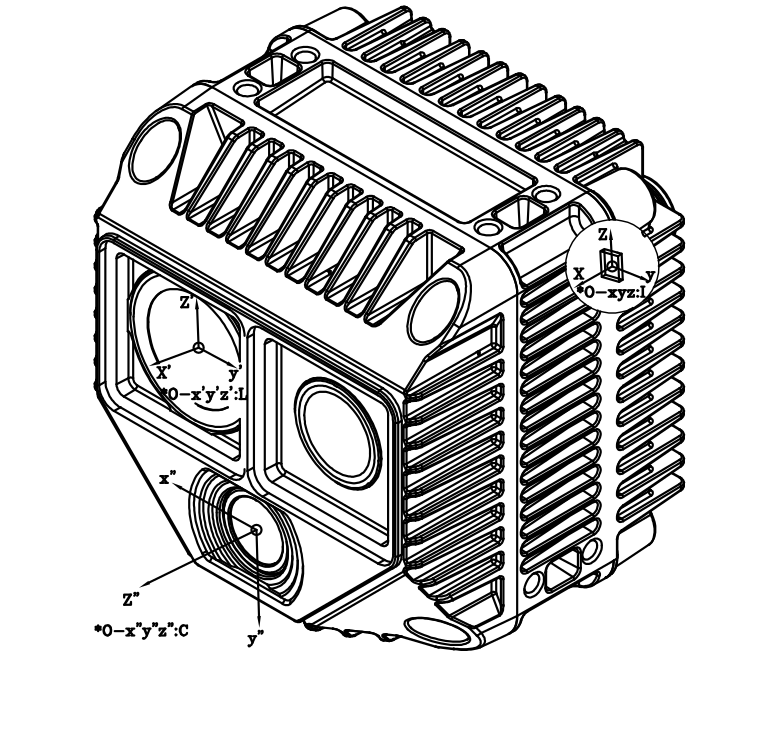
5.2 Extrinsic Parameter Description
Extrinsic parameter notation
We use $\mathbf{T}^{\text{A}}_{\text{B}}$ to denote coordinate transformation, meaning:
\[\mathbf{P}_{\text{A}} = \mathbf{T}^{\text{A}}_{\text{B}} \cdot \mathbf{P}_{\text{B}}\]where $P_A$ and $P_B$ are the coordinates of the object in frame A and frame B, respectively.
Camera - LiDAR
The extrinsic parameter $\mathbf{T}^{\text{camera}}_{\text{lidar}}$ varies among devices. After the driver starts, obtain it from config/calib.yaml (Tcl_0); see the driver for details.
Body - LiDAR
Note: The Body here is the former IMU, differing only in naming (expression); it corresponds to the same physical location.
The extrinsic parameter from Body (formerly IMU) to LiDAR, $\mathbf{T}^{\text{body}}_{\text{lidar}}$ (body_T_lidar in the calibration file), is:
Others
- If you need the Camera-to-Body extrinsic parameter, calculate it yourself from the above.
5.3 Intrinsic Parameter Description
Intrinsics mainly refer to the camera intrinsics; LiDAR intrinsics are not discussed.
5.3.1 Odin1 Lite Camera Intrinsics
- Methods to obtain intrinsics:
- Method 1 (runtime): After the driver starts, it pulls the calibration file from the device and saves it to
~/catkin_ws/src/ros_driver/config/camera_calib_<SN>.yaml; this varies per device. - Method 2 (ROS service): Run
ros2 service call /manifold/device0/get_calibration odin_ros_driver_rev1/srv/GetCalibration "{}"to get the YAML string directly. The actual service prefix is subject to the startup log orros2 service list. - Method 3 (HTTP Dashboard): Open a browser and visit
http://192.168.1.251:8080, then download from Dashboard → Calibration File Management.
- Method 1 (runtime): After the driver starts, it pulls the calibration file from the device and saves it to
# O1L-P040100047
cam_num: 1
img_topic_0: /camera/rgb
Tcl_0: [
  0.01814, -0.99980, -0.00813, 0.00579,
  -0.00071, 0.00812, -0.99997, -0.03109,
  0.99984, 0.01815, -0.00057, -0.01629,
  0.00000, 0.00000, 0.00000, 1.00000
]

cam_0_640_544:
        cam_model: FishPoly
        image_width: 640
        image_height: 544
        k2: 3.9309765393149745e-02
        k3: 1.5817608030575755e-01
        k4: 5.8836988291029024e-01
        k5: -8.2827749950756613e-01
        k6: 3.8543134263557260e-01
        k7: -6.3564147672175983e-02
        p1: 0.
        p2: 0.
        A11: 2.3172737533779440e+02
        A12: -4.1424461677121709e-02
        A22: 2.3167070553813502e+02
        u0: 3.1331230979976016e+02
        v0: 2.7959256780073559e+02
        isFast: 0
        numDiff: 3000
        maxIncidentAngle: 120

cam_0_1280_1088:
        cam_model: FishPoly
        image_width: 1280
        image_height: 1088
        k2: 3.9309765393149745e-02
        k3: 1.5817608030575755e-01
        k4: 5.8836988291029024e-01
        k5: -8.2827749950756613e-01
        k6: 3.8543134263557260e-01
        k7: -6.3564147672175983e-02
        p1: 0.
        p2: 0.
        A11: 4.6345475067558880e+02
        A12: -8.2848923354243417e-02
        A22: 4.6334141107627005e+02
        u0: 6.2662461959952032e+02
        v0: 5.5918513560147119e+02
        isFast: 0
        numDiff: 3000
        maxIncidentAngle: 120
5.3.2 Camera Model Description
Odin1 Lite RGB Camera Model and Intrinsics
This document describes the projection model and intrinsic parameters of the Odin1 Lite RGB camera for engineering reference.
1 Camera Projection Model
Odin1 Lite RGB uses a polynomial fisheye projection model to describe wide-field imaging. After undistortion, this model can be simplified to a standard pinhole model.
2 Polynomial Fisheye Model
2.1 Projection Formula
Given a 3D point in the camera coordinate frame $\mathbf{P_c} = (X, Y, Z)^T$, compute the incident radius:
\[r = \sqrt{X^2 + Y^2}\]Compute the incident angle:
\[\theta = \arccos\left(\frac{Z}{\sqrt{X^2 + Y^2 + Z^2}}\right)\]Polynomial radial mapping:
\[\theta_d = \theta + k_2\theta^2 + k_3\theta^3 + k_4\theta^4 + k_5\theta^5 + k_6\theta^6 + k_7\theta^7\]Project to the distortion plane:
\[x_d = \frac{\theta_d}{r} \cdot X, \quad y_d = \frac{\theta_d}{r} \cdot Y\]2.2 Affine Transformation
\[\begin{bmatrix} u \\ v \end{bmatrix} = \begin{bmatrix} A_{11} & A_{12} \\ 0 & A_{22} \end{bmatrix} \begin{bmatrix} x_d \\ y_d \end{bmatrix} + \begin{bmatrix} u_0 \\ v_0 \end{bmatrix}\]| Parameter | Description |
|---|---|
| k2–k7 | Polynomial distortion coefficients |
| A11 | X-axis focal length (horizontal scale) |
| A12 | Non-orthogonality compensation (skew) |
| A22 | Y-axis focal length (vertical scale) |
| u0, v0 | Principal-point coordinates |
2.3 Pinhole Model After Undistortion
\[u = f_x \frac{X}{Z} + c_x, \quad v = f_y \frac{Y}{Z} + c_y\]2.4 Coordinate Frame Convention
Odin1 Lite RGB follows the OpenCV camera coordinate frame: X → right, Y → down, Z → front (right-handed coordinate frame).
2.5 Engineering Notes
- Undistortion does not change extrinsics.
- For high-precision reprojection, use the polynomial fisheye model.
- For detection, SLAM, fusion and other algorithm frameworks, use the undistorted pinhole model.
- Numerical instability may occur when $\theta \to 0$ ($r \to 0$ causes division by zero).
5.4 Data Description
The raw point cloud (cloud/raw, resolution 256×192) PointCloud2 fields are as follows:
| Field | Data Type | Description |
|---|---|---|
x | FLOAT32 | X axis, unit: meter |
y | FLOAT32 | Y axis, unit: meter |
z | FLOAT32 | Z axis, unit: meter |
intensity | UINT8 | Reflectivity, range 0–255 |
confidence | UINT8 | Point confidence, range 0–255; higher is more reliable. Suggested threshold: 4 for indoor scenes; adjustable via confidence_threshold |
offset_time | FLOAT32 | Time offset relative to the frame baseline timestamp, unit: second |
Note: When a point’s
confidenceis belowconfidence_threshold, the driver will set the point’s x/y/z to 0.point_step= 18 bytes.
5.5 ROS Topics and Services Overview
Package name:
odin_ros_driver_rev1, main node:odin_ros_driver_node, post-processing node:post_process_node.All topics and services carry a per-device prefix
{prefix} = /{topic_prefix}/device{N}/(default/manifold/device0/). Only the suffixes are listed in the tables below.ℹ️ The device model no longer appears in topic/service paths; the model and SN are published in the JSON of
/{topic_prefix}/driver/device_online.ℹ️ The
imuthat appears in topic/field names and the Body referred to in this document are the same concept (same physical location, differing only in name).
5.5.1 Main Driver Node (odin_ros_driver_node)
| Topic suffix | Type | Description |
|---|---|---|
cloud/raw | sensor_msgs/PointCloud2 | Raw point cloud (256×192) |
cloud/slam | sensor_msgs/PointCloud2 | SLAM point cloud |
camera0/compressed | sensor_msgs/CompressedImage | Left RGB camera JPEG compressed image |
camera1/compressed | sensor_msgs/CompressedImage | Right RGB camera JPEG compressed image (valid only on binocular devices) |
gray | sensor_msgs/Image | Grayscale image (mono8) |
imu | sensor_msgs/Imu | IMU (acceleration + angular velocity) |
odometry_lf | nav_msgs/Odometry | Low-frequency odometry (includes pose covariance) |
odometry_hf | nav_msgs/Odometry | High-frequency odometry (includes pose covariance) |
In addition, the main driver publishes the following topics under the driver-level namespace /{topic_prefix}/driver/ (no device prefix, shared by all devices):
| Topic | Type | Description |
|---|---|---|
/{topic_prefix}/driver/device_online | std_msgs/String | Device online event (latched, JSON contains SN/model/prefix/IP) |
/{topic_prefix}/driver/device_offline | std_msgs/String | Device offline event (latched, JSON contains SN/model) |
/{topic_prefix}/driver/resolution_change | std_msgs/String | Resolution change event (latched) |
5.5.2 Post-processing and Functional Nodes
| Topic suffix | Type | Description |
|---|---|---|
camera0/raw | sensor_msgs/Image | Left RGB camera decoded image |
camera1/raw | sensor_msgs/Image | Right RGB camera decoded image (valid only on binocular devices) |
camera0/undistort | sensor_msgs/Image | Left RGB camera undistorted image |
camera1/undistort | sensor_msgs/Image | Right RGB camera undistorted image (valid only on binocular devices) |
camera0/rect | sensor_msgs/Image | Rectified left image |
camera1/rect | sensor_msgs/Image | Rectified right image (valid only on binocular devices) |
camera0/camera_info | sensor_msgs/CameraInfo | Rectified left camera intrinsics |
camera1/camera_info | sensor_msgs/CameraInfo | Rectified right camera intrinsics (valid only on binocular devices) |
cloud/render | sensor_msgs/PointCloud2 | Colored point cloud (point cloud + image fusion, LiDAR coordinate frame) |
reprojection/overlay | sensor_msgs/Image | Point cloud reprojected onto camera image overlay result |
pointcloud2depth/depth | sensor_msgs/Image (32FC1) | Dense depth map, unit meter; 0 means invalid pixel |
pointcloud2depth/depth_color | sensor_msgs/Image (bgr8) | JET colormap depth map |
pointcloud2depth/depth_overlay | sensor_msgs/Image (bgr8) | Depth map and camera image overlay result |
ℹ️ Odin1 Lite is a single-RGB device. The
camera1/*,stereo/*and other binocular / disparity-related topics retained in the driver code will not publish data on Odin1 Lite.
5.5.3 Point Cloud Compressed Transmission
The base topics cloud/raw and cloud/slam are always standard sensor_msgs/PointCloud2 and can be subscribed directly in RViz. After installing the compression plugin and restarting the driver, additional /zlib, /zstd, /draco compressed sub-topics are provided:
# ROS2 Humble; replace humble according to your ROS distribution
sudo apt install ros-humble-point-cloud-transport-plugins
RViz cannot display compressed point clouds directly; to visualize them, use
point_cloud_transport republishto decompress to a normalPointCloud2. No plugin installation is needed if only uncompressed point clouds are used.
5.5.4 Services
| Service suffix | Type | Description |
|---|---|---|
get_calibration | odin_ros_driver_rev1/srv/GetCalibration | Get camera calibration YAML content |
set_sensor_mode | odin_ros_driver_rev1/srv/SetSensorMode | Switch Sensor Mode (0=HDR / 1=High Peak / 2=Low Peak / 3=Adaptive) |
reset_initial_pose | odin_ros_driver_rev1/srv/ResetInitialPose | Reset SLAM initial pose, map and factor graph |
get_adaptive_param / set_adaptive_param | GetAdaptiveParam / SetAdaptiveParam | Query / set adaptive-mode parameters; effective only in Adaptive mode |
get_sync_mode / set_sync_mode | GetSyncMode / SetSyncMode | Query / set default time-sync mode; device restart required after setting |
get_ptp_sync_status | odin_ros_driver_rev1/srv/GetPtpSyncStatus | Query PTP sync status, offset, path delay and frequency adjustment |
restore_default_config | odin_ros_driver_rev1/srv/RestoreDefaultConfig | Restore factory configuration; device restart required after execution |
device_mode | odin_ros_driver_rev1/srv/DeviceMode | Set device mode (0=Standby / 1=Normal / 2=Upgrade / 3=SLAM / 4=Relocation / 5=ReMap) |
save_map | odin_ros_driver_rev1/srv/SaveMap | Save loop-closure map to host file |
load_map | odin_ros_driver_rev1/srv/LoadMap | Load map from host file for relocalization or ReMap |
exploy_map | odin_ros_driver_rev1/srv/ExployMap | Export current loop-closure map to host file (specific format determined by plugin) |
set_diag_monitor | odin_ros_driver_rev1/srv/SetDiagMonitor | Enable / disable 1 Hz frame-rate and latency diagnostics, and publish /diagnostics |
set_channel_config / get_channel_config | SetChannelConfig / GetChannelConfig | Batch set / query main driver layer-A data channel switches |
set_post_process_config / get_post_process_config | SetPostProcessConfig / GetPostProcessConfig | Batch set / query post-processing layer-B switches; service prefix is /{topic_prefix}/postprocess/ |
5.6 ROS Driver Acquisition
Odin1 Lite ROS driver: https://git.manifoldtech.cn/manifoldtech-sdk/odin_ros_driver2
Odin1 Lite SDK: https://git.manifoldtech.cn/manifoldtech-sdk/odin-sdk2
For detailed deployment and running steps, see 7. Odin1 Lite Quick Start (Ubuntu).
← Previous Chapter:Power and Connection | Next Chapter:Mapping and Relocalization API Workflow →